Implant Intelligence
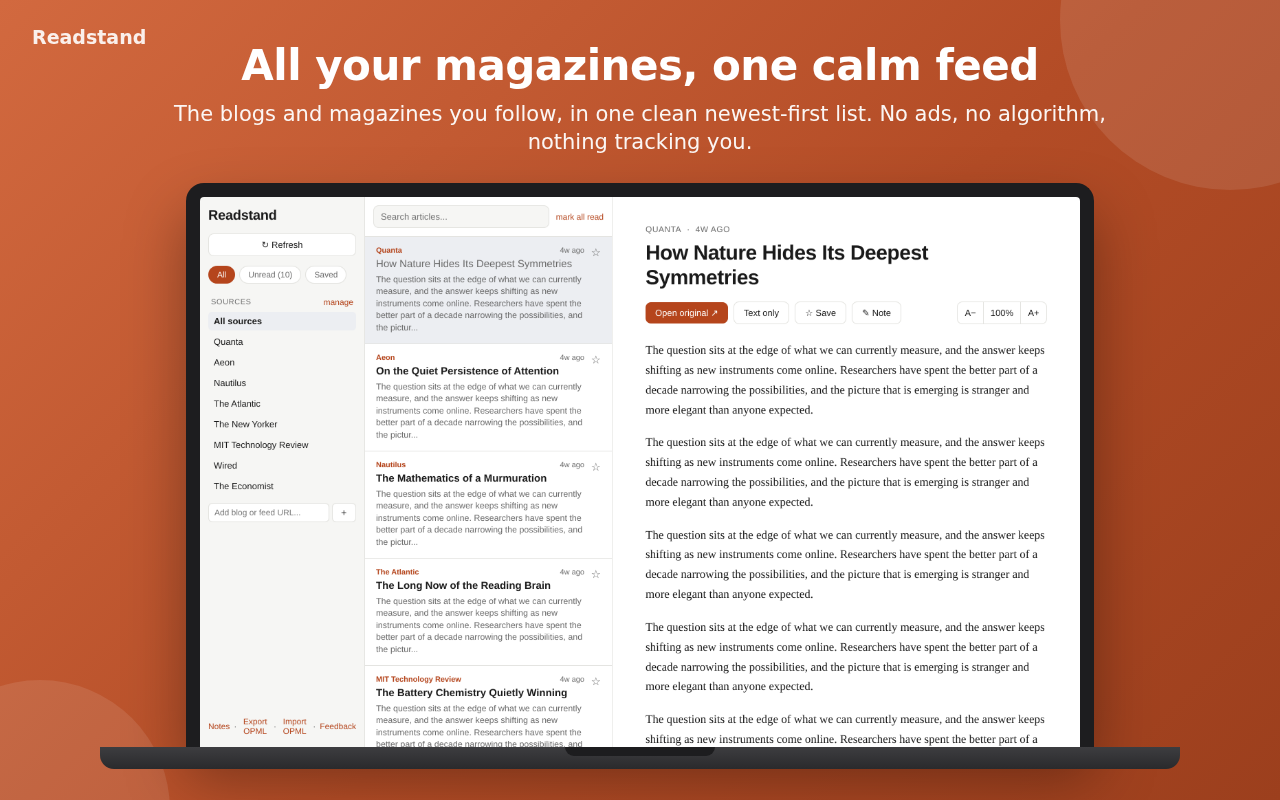
Every source you follow in one unified, newest-first feed
About
Readstand pulls the RSS, Atom and JSON feeds you follow into one reading list. Open an article and the clean version loads on its own. Highlight a line, jot a note, and export the lot to Markdown when you want it in Obsidian.
There is no account and no server. Subscriptions, notes and reading progress stay in your browser. I built it because I learned a lot from magazines as a kid and wanted that habit back without a stack of subscriptions. Open source under the AGPL-3.0.
What you get
- Chrome Web Store for Chrome, Edge, Brave, Arc
- Firefox zip (v0.1.4) for Firefox (258 KB)
- Extension zip (v0.1.4) for Manual install in any Chromium browser (258 KB)
- Linux .deb (v0.1.1) for Debian, Ubuntu, Mint (4.3 MB)
- Linux AppImage (v0.1.1) for Any Linux x86_64 (87.5 MB)
Features
One feed
Every source merged, newest first. Filter by unread or saved, or search across everything.
Reader view
The clean article loads when you open it. When a page hands over a teaser, an archived copy stands in.
Continue reading
Unfinished articles wait in the sidebar with a progress marker.
Notes and highlights
Select a sentence to keep it. Add a Learned or To-read note without leaving the page.
Markdown export
One click puts every note and highlight in a file for Obsidian or any notes app.
Paste anything
A site, a post or a feed URL. Readstand finds the feed, including section feeds on the big publishers.
Keyboard first
j and k move between articles, s saves, / searches, Esc goes back.
The whole loop in a few seconds
Read, highlight a line, jot what you learned, export to Markdown.

What's new v0.1.4
- The layout finally fits your screen: drag the divider between the article list and the reader to rebalance them, double-click it to reset
- Pick how wide the reading column runs: Narrow, Medium, Wide or Full, next to the text-size buttons
- Zoom without reaching for the mouse: - and = step the text size, 0 resets, and Ctrl+scroll or a trackpad pinch over the article works too
- Sources are easier to manage: the add box sits at the top, drag a source to reorder the list, hover one for a one-click unsubscribe
- On the phone the reader actions moved into a bottom bar within thumb reach, and the filter chips ride on the list itself
Requirements
- Chrome, Edge, Brave or Arc for the store install
- Firefox build ships as a zip; it is not on Mozilla Add-ons yet
- Linux x86_64 for the desktop app
Privacy
No account, no analytics, no server. Your data stays in the browser. The only network requests go to the feeds and articles you open.
Questions
Is it free?
Yes. Open source under the AGPL-3.0, with the code on GitHub.
Does it run on a phone?
The code builds as an installable web app, but that build needs a small feed proxy and is not hosted yet. Use the extension or the desktop app for now.
Why is the desktop app an older version?
The desktop build is packaged less often. 0.1.1 is the latest desktop release; the extension is on 0.1.4.